First Class
The final onboarding step lets you create your first class. You can choose from preset class types or build a custom class from scratch.
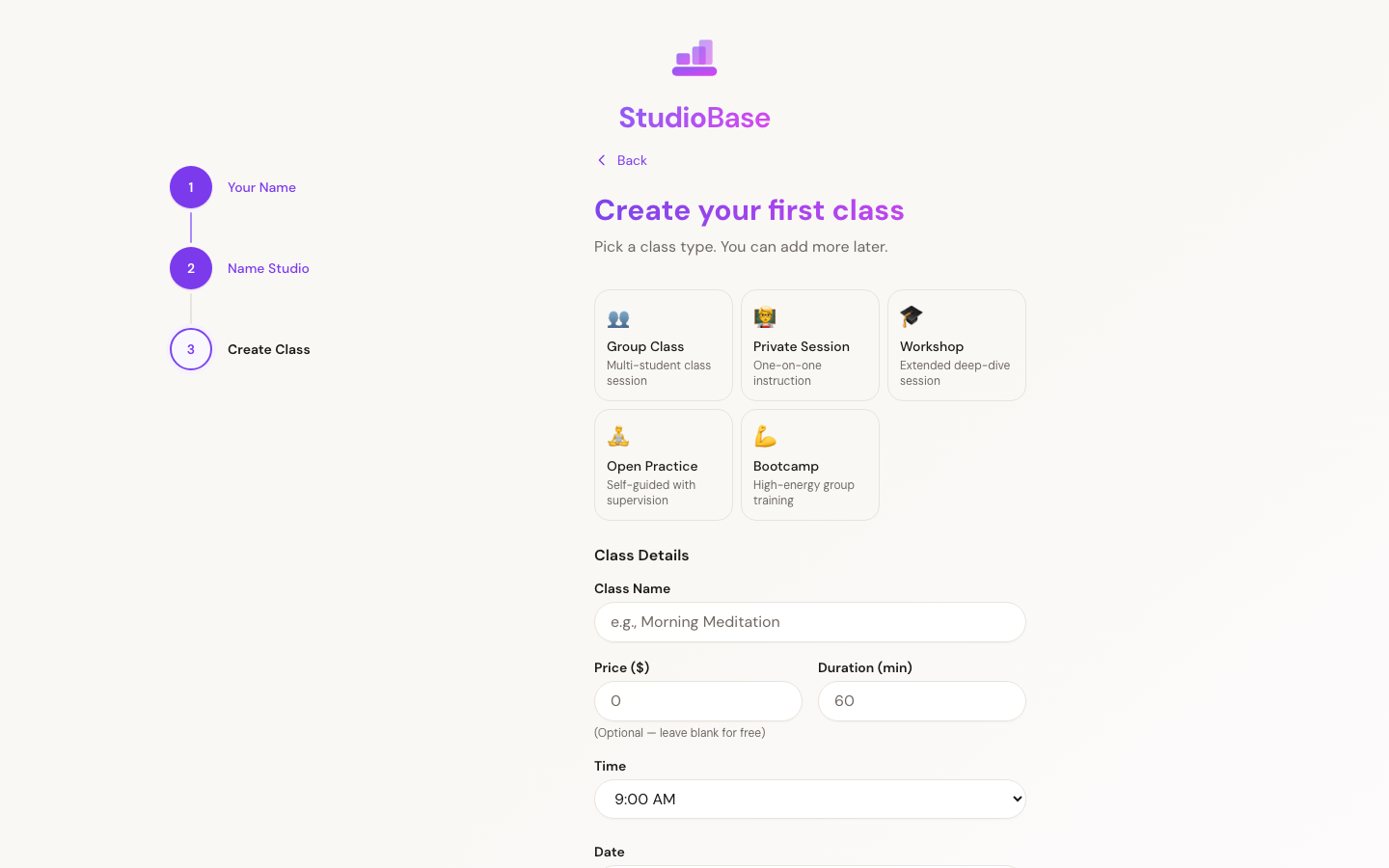
Preset Class Types
Five preset buttons are available for quick setup:
- Group Class — standard group session
- Private Session — one-on-one instruction
- Workshop — extended special event
- Open Practice — unstructured practice time
- Bootcamp — high-intensity training
Selecting a preset auto-fills the class name, default price, and duration. You can adjust any of these before creating.
Custom Class
To create a class from scratch, fill in:
- Class name — what students will see
- Price — leave empty for a free class
- Duration — in minutes (minimum 15)
- Time — choose from 6 AM to 8 PM
- Date — defaults to tomorrow
Skipping This Step
You can skip class creation and go straight to your dashboard. You can always create classes later from the Add Class page.
What's Next?
After creating your first class (or skipping), you'll land on your Dashboard where you can manage your studio, add more classes, and start accepting bookings.
Your first class is just a starting point. You can modify it, add more classes, and set up recurring schedules from your dashboard.